POdcast Studio Rental in Tampa Bay
Renting a podcast studio in Tampa Bay is not the same as renting a general production stage. A podcast production depends on controlled acoustics, clean multi-microphone capability, reliable power and connectivity for remote guests, and a camera and lighting configuration that holds across a long recording session. This guide covers what to look for when evaluating a podcast studio rental and what to confirm before booking.
Quick answer: A podcast studio rental in Tampa Bay should offer acoustic treatment or sound isolation, support for multi-microphone setups, dedicated power and connectivity for remote guests, camera and lighting infrastructure for video output, and monitor displays for hosts and guests. Contact the studio directly to confirm what is included in a rental versus what requires outside gear.
Acoustic Treatment and Sound Isolation
The most important factor in a podcast studio is what you hear on the recording.
A studio with purpose-built acoustic treatment or a purpose-built recording environment reduces post-production time significantly. Ask specifically how the studio handles HVAC noise, which is a common source of low-frequency bleed that appears in longer recordings. A room that sounds clean during quiet moments in the room may not sound clean on microphone.
If the studio is located within a larger facility, confirm how it is isolated from surrounding stages, hallways, and mechanical systems.
Multi-Microphone Configuration
Most podcast formats use two to four microphones simultaneously. Some formats run six or more.
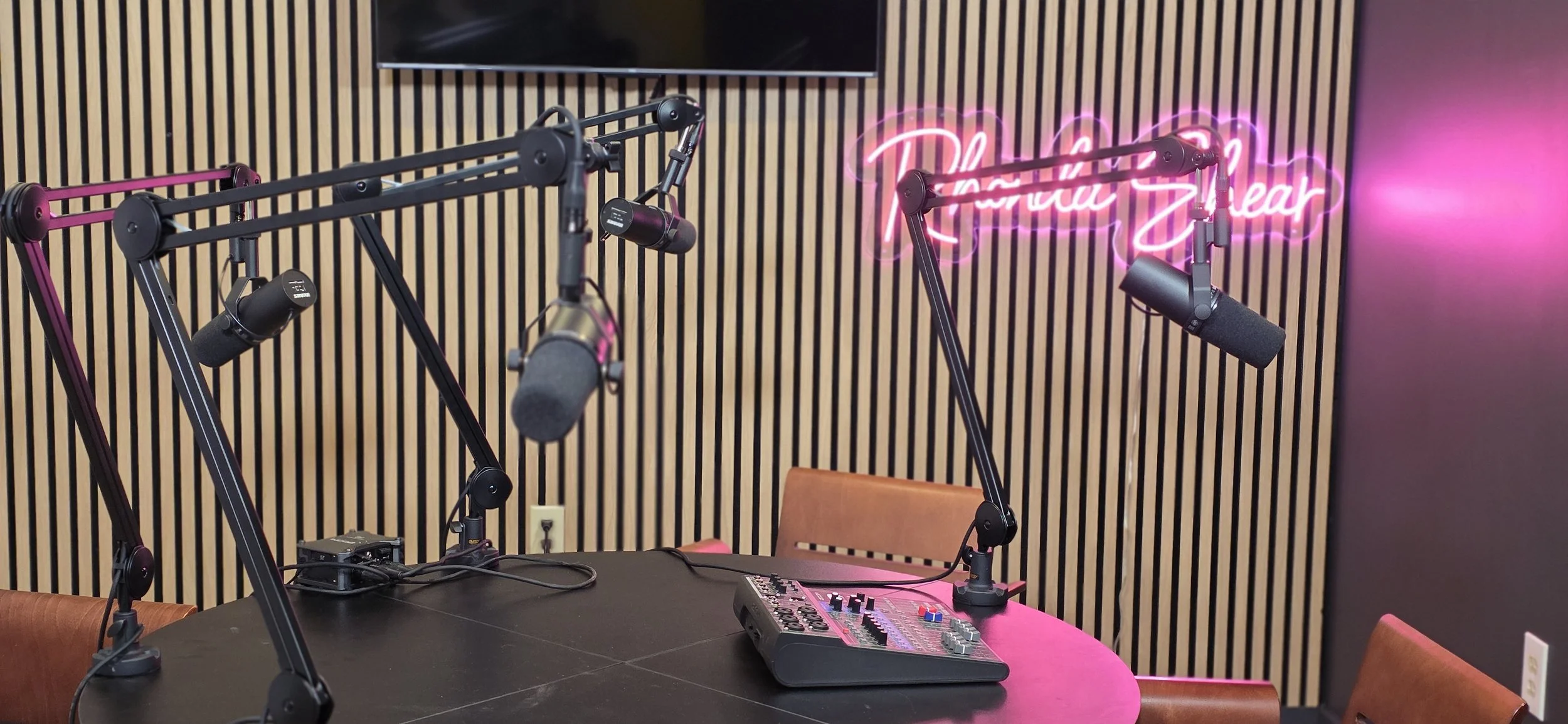
A studio configured for podcast production should have mic stands, boom arms, or overhead positioning options that allow microphones to be placed correctly for each seat. Confirm whether the studio provides microphones or whether that requires outside rental. Confirm what the maximum microphone count is without significant reconfiguration.
If you are recording audio-only, the microphone quality and room acoustics are the entire product. If you are recording a video podcast, the microphone quality matters equally alongside the camera and lighting setup.
Remote Guest Connectivity
Most podcast productions now include at least one remote guest, and many run entirely in hybrid format.
Confirm whether the studio has dedicated internet connectivity for remote guest integration, whether they have experience with Riverside, SquadCast, Zoom, or similar remote recording platforms, and whether the technical setup allows a remote guest to be displayed on a monitor visible to the in-studio host.
Some studios provide a complete remote guest setup as part of the rental. Others require outside production support for hybrid recording.
Video Podcast Capability
Video podcasts have specific requirements that overlap with but differ from audio-only podcast setups.
A video podcast needs a consistent camera angle per seat, a lighting configuration that holds for the full recording session without significant adjustment, a clean background or intentional set dressing, and a way to monitor the camera output during recording. If the podcast is formatted for clip-based social distribution, consider whether the studio setup supports easy reframing for vertical and square formats.
Confirm whether camera equipment is included in the studio rental or must be brought in separately.
Lighting Configuration for Long-Form Recording
Long-form interviews and podcast episodes run anywhere from 30 minutes to several hours.
A studio relying entirely on on-camera LED panels can produce heat and power management challenges over a long session. A studio with a fixed overhead lighting grid allows the lighting configuration to be set once and remain consistent across the session without adjustment. Confirm how the studio handles lighting for podcast formats and whether the configuration is suited for the session length you are planning.
Production Support and Technical Staffing
Confirm what is included in a basic studio rental versus what is available as an add-on.
Some studios provide a technical engineer who manages levels, remote connectivity, and recording logistics. Others rent the room and expect the production team to manage everything. For recurring podcast productions, knowing the staffing model in advance prevents scheduling conflicts.
In-house production support at some studios includes level management, remote guest monitoring, file delivery, and basic post-production coordination. These are confirmed service additions, not automatic inclusions in a basic rental.
Recurring Podcast Production
A recurring weekly or bi-weekly podcast has different needs than a one-time recording.
Confirm whether the studio offers recurring booking arrangements, whether the room configuration can be held between sessions, and what the production workflow looks like across multiple episodes. Studios that support recurring podcast productions often have a preset configuration that allows each session to begin quickly without a full reset. For additional information on what recurring production arrangements look like, see recurring weekly show production in Tampa Bay.
Shear Media Studios for Podcast Production
Shear Media Studios is an approximately 15,000 sq. ft. production studio in St. Petersburg serving Tampa, Clearwater, and the greater Tampa Bay area. The facility includes Studio A at approximately 2,800 sq. ft., which is suited for controlled-environment video and audio productions including podcast setups, multi-camera interviews, and green-screen formats.
In-house production support is available for podcast productions when needed, including engineers, technical support, and connectivity infrastructure for remote guests. Outside production teams are welcome to bring their own crews and recording setups.
Contact Shear Media Studios to discuss your podcast production format and confirm what the studio provides for your specific setup.
For broader context on evaluating any Tampa Bay studio, see how to choose a production studio in Tampa Bay. If your podcast format is video-first with a dedicated production setup, see the video podcast studio guide for Tampa.
FAQ
What should I look for in a podcast studio rental in Tampa Bay? Look for acoustic treatment or a purpose-built recording environment, support for multi-microphone setups, dedicated connectivity for remote guests, camera and lighting infrastructure for video output, and monitor displays for hosts. Confirm what is included in the rental and what requires outside production support before booking.
Do podcast studios in Tampa Bay provide microphones and audio equipment? It depends on the studio. Some include microphone setups as part of the rental. Others rent the room and infrastructure only, requiring the production team to bring recording equipment. Confirm the equipment policy when inquiring, and ask specifically about microphone stands, boom arms, and recording interface availability.
What is the difference between a podcast studio and a standard production stage? A podcast studio is optimized for long-form audio and video recording in a controlled acoustic environment with multi-seat microphone configurations and often fixed lighting. A standard production stage offers more flexible floor space for varied setups but may not have the acoustic treatment, fixed camera mounts, or multi-mic configuration a podcast production requires.
Can I record a video podcast at Shear Media Studios in Tampa Bay? Yes. Studio A at Shear Media Studios is suited for controlled video and audio production including video podcast formats. Contact Shear to confirm the specific camera, lighting, and audio setup available for your format and episode count.
How much does it cost to rent a podcast studio in Tampa Bay? Podcast studio rental rates vary based on the room, session length, services included, and recurring versus one-time booking. Contact Shear Media Studios directly for current rates and package options.
Can I bring my own podcast production crew to a Tampa Bay studio? Yes. Shear Media Studios welcomes outside production teams with their own crew and equipment. In-house technical support is also available as an optional add-on when needed.